Document engineering
OCR table extraction: keep blank cells from shifting your data
To keep blank cells from shifting OCR table values, match each value to its row and column on the page. In a Rubix research experiment, pairing nonempty entries by order put Cargo's 2500 deductible against Equipment. Matching row positions improved exact cell outcomes from 16 of 24 to 20 of 24 across four synthetic fixtures. The remaining four errors were character recognition, so every page still needed review.
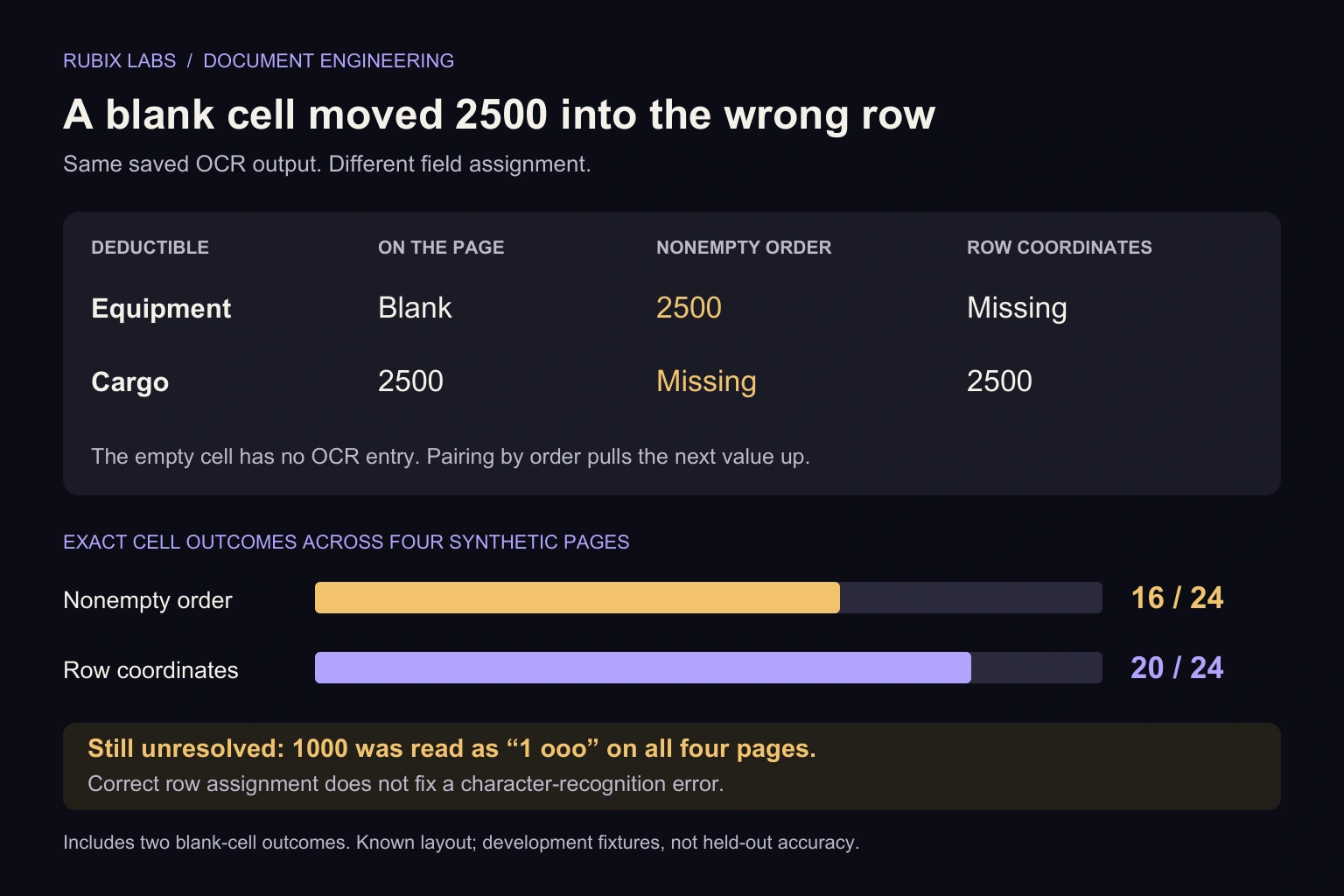
Cargo's deductible ended up against Equipment
Our example has three rows: Property, Equipment and Cargo. Each has a limit and a deductible. On one page, Equipment's deductible is blank and Cargo's is 2500. OCR reads 2500 correctly. Then our first parser collects the nonempty deductible entries, sorts them from top to bottom and pairs them with the three row labels in order.
There's no entry for the empty cell. The parser moves 2500 up to Equipment and leaves Cargo with no value. A numeric validation rule would accept 2500 quite happily. It can't tell that the number belongs one row lower.
Our PDF text extraction guide covers choosing between a text layer and OCR. This failure came later, when the parser turned recognized text into fields. Changing the OCR engine wouldn't address that assignment rule.
| Deductible row | On the page | Nonempty values in order | Matched by row position |
|---|---|---|---|
| Equipment | Blank | 2500 (wrong row) | Missing |
| Cargo | 2500 | Missing | 2500 |
Four small pages, one OCR engine
We ran this on November 27, 2026 using Windows.Media.Ocr with English (en-US), on Windows build 26200 and an AMD Ryzen 9 9950X3D. The inputs were four clean 1500 × 1000 PNGs we created for the experiment, with one font and a known table layout. They aren't ACORD forms or customer documents.
One page had all six numeric cells filled. The second left the middle deductible blank. The third put an explicit 0 there. The fourth kept the blank but swapped the Limit and Deductible columns. We saved one OCR result per page and fed that same result to both assignment methods.
These are development fixtures built to expose a specific bug. We didn't reserve a held-out set, test photographed pages or compare OCR providers. We also didn't run a latency benchmark.
Match values to the row labels
The second parser started with the cells we expected. It located the Limit and Deductible headers, grouped the OCR lines beneath those headers and matched each candidate's vertical position to a known row label. No candidate in that row meant a missing value. It didn't borrow the next row's entry.
Both parsers used header positions, so swapping the columns didn't confuse their names. The difference was row assignment: one used the order of surviving entries; the other used their positions on the page. Microsoft's API returns word positions that our code used for this matching. Tesseract offers positional output through TSV and hOCR too, although we didn't run it here.
This parser knew the three row labels and the layout. Merged cells, wrapped descriptions, repeated headers and tilted scans would need more work. We'd retain the page number, bounding box and original text with each proposed value so a reviewer could check the assignment against the image.
The four cases, including the misses
We counted a cell as exact only when its value matched the fixture, or when a deliberately blank cell stayed missing. Each page had six target cells. The coordinate method removed the four wrong outcomes caused by the two blank-cell shifts. It didn't improve the recognized characters.
| Synthetic fixture | Nonempty order | Row coordinates |
|---|---|---|
| All numeric cells filled | 5 / 6 | 5 / 6 |
| Middle deductible blank | 3 / 6 | 5 / 6 |
| Middle deductible is 0 | 5 / 6 | 5 / 6 |
| Columns swapped; middle deductible blank | 3 / 6 | 5 / 6 |
| Total exact cell outcomes | 16 / 24 | 20 / 24 |
1000 came back as 1 ooo
Every page had a Property deductible of 1000. Every OCR result read it as '1 ooo', with letters instead of zeros. Both parsers sent that value to review because it failed the digit-only check. Knowing which row it belonged to couldn't repair the text.
So the coordinate result is 18 correctly read and assigned numbers, plus two correctly preserved blanks. The other four supplied numbers remained unresolved. None of the four pages was fully correct.
Replacing every o with 0 would make this fixture look better. We'd need to test that correction on other inputs before trusting it, though. For this run, we kept the raw '1 ooo' and the review state.
Keep blank, zero and unreadable separate
The explicit 0 survived both methods. Treating it as false in application code would introduce a different missing-value bug. We'd keep a proposed numeric value, a missing candidate and an unreadable candidate as separate states.
On a real scan, no OCR candidate doesn't prove the cell was blank. The engine may have missed faint ink. Our fixtures tell us which cells we deliberately left empty; a production workflow needs image review or another justified check before treating absence as confirmed.
That distinction matters before a rules engine evaluates a document. A missing limit shouldn't become zero, and a number on the wrong row shouldn't decide compliance. Our COI tool guide covers that later decision step; the insurance intake article covers disagreements across documents.
Try a blank in the middle of your own test table
If your parser pairs lists by position, remove a middle value from a test table and inspect the saved fields. Does the next number move up? Try an explicit zero too. Score the cell's identity as well as its contents. An unfamiliar layout needs more than this known-table parser; we'd evaluate a layout extractor on representative pages before trusting its rows.
Rubix's Document OCR case study shows extraction carried through to structured output and human review. This experiment is separate. If the text looks fine but your saved fields don't, bring us a fictional table that reproduces the problem. We can help trace where the mapping goes wrong and build the review step around it. That's part of the AI automation work on our pricing page.