Insurance engineering
Build an AI-assisted COI compliance tool
A carrier uploads a certificate of insurance. The system reads it, checks the requirements and tells them exactly what needs fixing. They send a replacement, and the checks run again. That's the COI compliance tool we'd want to use: something that helps people finish the submission without another round of 'please see attached'.
The workflow we've worked on
Our team built a COI compliance workflow for a business whose carrier companies handled dispatch operations. We used Sensible for document extraction, then passed the parsed data into our own rules engine. Compliant submissions triggered a notification. When a submission didn't meet the requirements, the carrier received the issues and could fix and resubmit it.
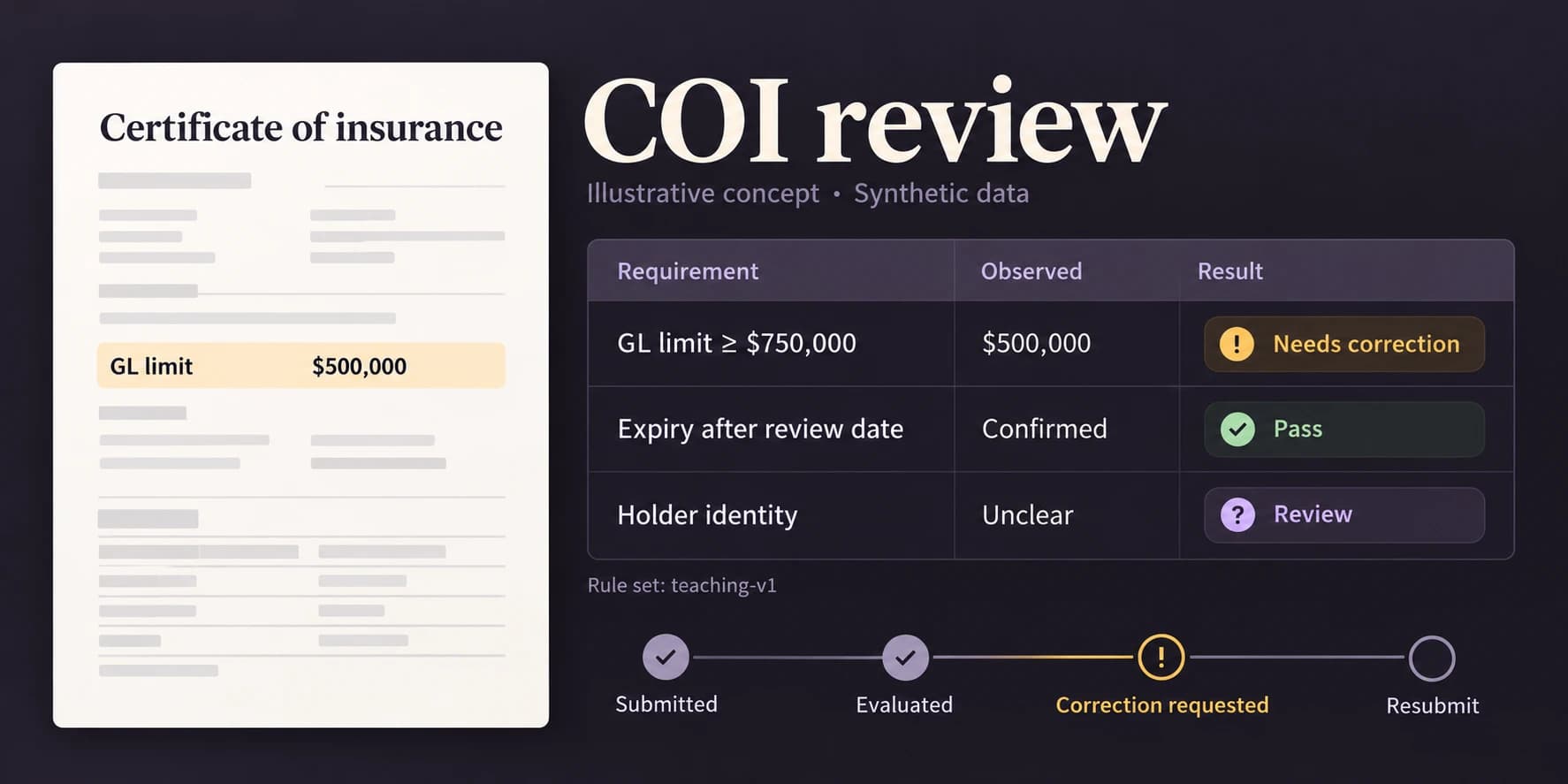
In this Rubix Labs guide, we'll work through how we'd build the system today. The linked demo lets you try both sides: submitting a COI and reviewing it. Its ACORD samples use made-up data and requirements. The platform pictures elsewhere in this guide are concept illustrations.
By compliance here, we mean checking submitted evidence against an approved set of business requirements. A COI doesn't create or change insurance coverage. For example, the Texas Department of Insurance explains that a certificate cannot alter the underlying policy. Your insurance and legal owners need to approve the requirements, jurisdiction-specific interpretation and any decision that needs policy or endorsement review.
Map the whole COI journey before building the uploader
There are two people to design for: the carrier trying to finish a submission and the operator trying to decide what can be accepted. Give both the same submission reference. The carrier shouldn't have to explain which PDF they mean every time they call.
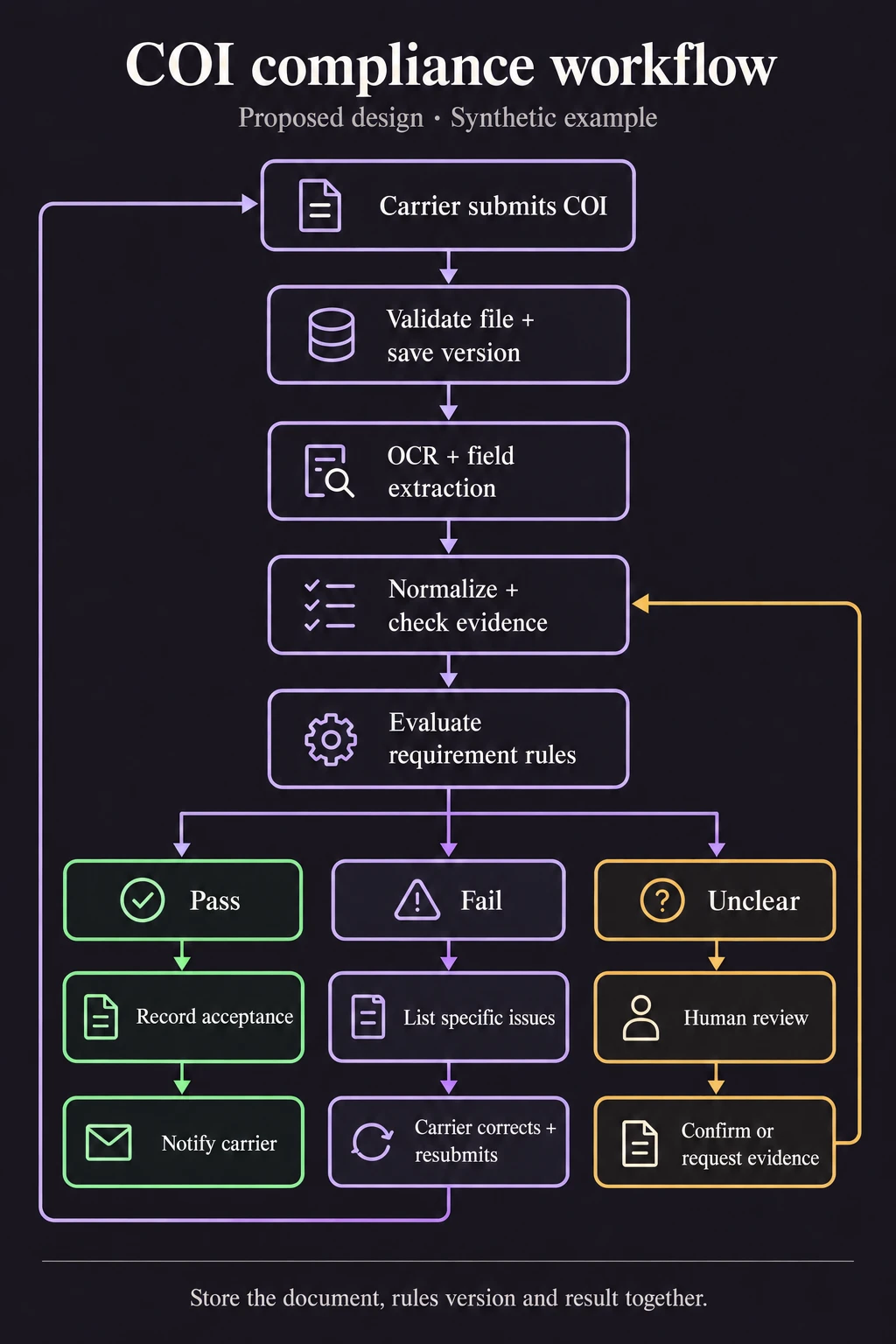
The proposed flow is upload, file validation, extraction, normalization and rule evaluation. A confirmed failure produces specific correction requests. Unclear evidence goes to review. When all required checks are satisfied and the approval policy allows it, record acceptance and notify the carrier. A replacement file starts a new version of that journey.
The carrier should be able to close the tab without losing their submission. We'd save it first, return a reference and let a background job handle extraction. The browser can check progress when they come back. If OCR fails, show a processing problem. There's no reason to tell someone their insurance is deficient because a service timed out.
Sensible or Tesseract: what the OCR layer must return
Sensible was the extraction service in our project. For a new integration, its current API supports asynchronous extraction from a supplied URL, including a presigned document URL, with polling or a webhook to retrieve results. Save the provider job ID against the submission. A callback should identify work you've already authorized, not choose an arbitrary account to update.
Tesseract gives you a local OCR option. It accepts images, so scanned PDFs need conversion to supported image inputs first. Its TSV and hOCR outputs can retain text positions. You still need to map that text into insurance fields, associate values with the right coverage row and handle checkboxes. OCR output alone isn't a COI parser.
Both routes should feed the same internal field format. That keeps the rules engine from caring which OCR tool read the file. An AI model can suggest how an unfamiliar label maps to a field, or help interpret an operations description. We'd show the suggestion beside the source text and send uncertainty to review. The document is untrusted input: nothing written inside it gets to change the rules or grant the model permission to use tools.
Keep the value and the evidence together
A dollar amount needs a coverage type and a limit basis. A general aggregate value can't silently fill an each-occurrence field because both happen to contain a large number. Keep the original text, normalized value, document version and page reference together. If the provider returns coordinates, preserve those so the reviewer can jump to the right spot.
Missing, unreadable and false need different meanings. An unchecked box is different from a box the scan cut off. For money, parse the format you support and reject malformed values. For dates, validate the calendar date and preserve any policy time and zone needed for interpretation. Don't let a convenient JavaScript conversion decide what the document meant.
| Record | What we'd retain |
|---|---|
| Carrier | Internal identity, authorized contacts and applicable requirement profile. |
| Submission | Carrier ID, original file reference, content hash, received time and replacement relationship. |
| Extraction | Provider/configuration version, raw output, normalized fields and source locations. |
| Evaluation | Submission and rules version, evaluation time, each rule result and supporting evidence. |
| Review and messages | Reviewer decision/reason, approved corrections, notification attempts and delivery status. |
Make the requirements explicit enough to test
The first useful deliverable is a decision table agreed with the business and insurance owners. It needs to say which coverage applies to the work, what evidence is enough and where an endorsement or policy interpretation is required. If two reviewers disagree about a requirement, that's a meeting to have now. Putting the disagreement inside a prompt won't resolve it.
Each rule needs a stable ID, applicability condition, required fields and a version. Give it pass, fail or review as possible results. A review result means the evidence doesn't support a decision yet. Keep advisory recommendations separate from blocking failures, and record authorized exceptions explicitly. Otherwise a green badge can mean several different things depending on who last clicked it.
The rule result should carry what was observed and what was required. Use that same result to populate the operator screen and the carrier's correction message. Maintaining a second requirements table inside an email template gives you another place to forget an update.
| Check | Automatable comparison | Where we'd stop for review |
|---|---|---|
| Required limit | Validated amount against the approved threshold for that coverage and basis. | Missing amount, ambiguous currency or uncertain coverage row. |
| Policy dates | Validated dates against an explicitly defined evaluation time. | Unreadable date, conflicting documents or unresolved policy-time semantics. |
| Insured and holder | Approved identity matching rules against the correct entities. | Abbreviation, mismatch or ambiguous entity; holder is not automatically an additional insured. |
| Additional-insured requirement | Check that the required evidence was supplied. | Determine policy/endorsement effect through the responsible insurance reviewer. |
Try the COI compliance demo
The portal has three fictional certificates on the ACORD 25 (2016/03) form. All three belong to Rubix Demo Insured LLC. Preview one before submitting it: the differences are in the limits and policy dates, not a different insured hiding in each sample.
COI 01 meets the initial profile. COI 02 has lower limits and expired policies, so the carrier gets specific issues to resolve. COI 03 is more interesting: its PDF shows USD 1,000,000, but our simulated extraction reads 1,OOO,OOO with letter O's. Open that submission in admin, inspect the highlighted amount and record a correction with a reason. The rules run again; the reviewer doesn't get a magic approve button.
Try raising the general-liability requirement to USD 1,250,000 in the admin's rule profile. The same COI 01 now falls short. You can compare the old and new decisions in its history. A replacement submission also keeps its link to the previous COI, rather than quietly overwriting it.
The starting profile checks general liability of at least USD 750,000, auto liability of at least USD 1,000,000, policy dates active on 25 October 2026, the named insured and the certificate holder. These are teaching requirements, not client requirements or recommended insurance limits. Extraction is prepared sample data; the demo doesn't call an OCR provider, send messages or determine policy coverage. Your changes stay in this browser. Rubix can help turn that small loop into a tool connected to your own approved requirements and systems.
| Synthetic input change | Expected result |
|---|---|
| USD 500,000 against a USD 750,000 minimum | Limit fails; request correction when other required facts are resolved. |
| USD 750,000 with other checks passing | Meets the teaching rules, including equality at the minimum. |
| 1,OOO,OOO, with the letter O | Review; do not silently turn uncertain characters into digits. |
| Missing limit | Review; missing evidence is not a confirmed zero. |
| Expiry is 2026-02-30 | Review; that calendar date doesn't exist. |
| Expiry is the example review date | Fails this example's strict date rule; the expiry must be later. |
Tell the carrier what would resolve each issue
A message saying 'Your COI is noncompliant' leaves the carrier doing detective work. In our made-up limit example, the useful message is: 'The submitted COI shows a general-liability each-occurrence limit of USD 500,000. This requirement profile asks for USD 750,000. Please ask your insurance representative to review the requirement and supply the appropriate evidence through this submission.'
That wording requests evidence. It doesn't tell someone to edit a certificate to show coverage they don't have. For an unreadable field, ask for a clearer document instead of announcing a coverage deficiency. Show the issue, the relevant requirement and a secure way to respond on the portal as well as in the message.
The replacement gets a new version and a fresh evaluation against the applicable rules. The operator can then see the original USD 500,000 value, the replacement USD 750,000 value and which issues remain. Keep the old review intact. An acceptance attached to yesterday's file doesn't automatically tell you anything about today's replacement.
The reminder needs to know when to stop
COI tracking continues after the first decision. Acceptance, corrections and renewals each need their own message and timing. Extraction trouble belongs in an operations queue, with a bounded retry or a reviewer assigned. Nobody wants three automated emails asking them to fix a document that's still waiting to be read.
Suppose a carrier uploads the replacement five minutes before a reminder is due. The sending worker needs to read the current state and cancel the stale message. Tie every reminder attempt to the carrier, requirement profile, submission cycle and reminder stage. Also keep 'the email provider accepted it' separate from 'it was delivered'. Operations needs to see failed sends.
| Current state | Proposed communication | Stop or change the cadence when |
|---|---|---|
| Meets configured requirements | Send the recorded acceptance and its scope. | Another version or a relevant rule/policy change requires reevaluation. |
| Needs correction | Send unresolved issues with the submission reference. | Replacement arrives, review starts or the relationship ends. |
| Needs review | Acknowledge receipt and assign an operator. | The reviewer confirms facts or requests specific evidence. |
| Extraction failed | Show processing trouble; queue an operator or a bounded retry. | Extraction succeeds or the operator resolves the failure. |
| Renewal approaching | Request updated evidence under the agreed schedule. | A replacement satisfies the renewal requirements or an authorized owner pauses it. |
Build the review screen around the disputed field
Put the document beside the rule results. Clicking a limit issue should open the right page, with the extracted amount and expected amount visible. Give the reviewer a way to correct an extraction, request evidence or record an authorized exception. A correction needs a reason and a reevaluation; changing a label alone doesn't resolve the underlying rule.
Keep carrier status, document processing status and rule outcome as separate fields. A carrier can have a submission in review while an earlier accepted document remains in history. The screen should make that relationship obvious. For an exception, retain who approved it, its scope and expiry, without displaying it as an ordinary pass.
We'd give operators a queue for missing evidence, failed processing and approaching renewals. The useful question is what needs attention next. A giant list of green rows doesn't help the person trying to find the one submission that has been stuck since Monday.
Protect the documents and save decisions before sending
Authorize every upload, document read and review action against the carrier account and operator role. Check file size and actual type, scan uploads as appropriate and keep documents in private storage. Use short-lived access links and an agreed retention policy. Keep raw documents, contact details and signed URLs out of routine logs.
Commit the evaluation and its intended notification together, then let a worker send the message from that saved record. A durable outbox helps avoid emailing an acceptance that the database never stored. It still needs retry and duplicate handling: an email provider can accept a message just before your worker loses the response.
Callbacks and scheduled jobs need the same care as the upload screen: protected access, validated inputs and a known job to act on. A repeated callback must be safe. A late result for submission 1 must not overwrite the evaluation of submission 2. Build those cases into the job handler from the start.
Try the awkward cases before widening the rollout
Start with one agreed COI document family and requirement profile. Build a small approved test set with expected field values and rule outcomes. Include a missing page, shifted table columns, an unclear checkbox, a date boundary and an endorsement that needs review. Measure false acceptance separately from extraction accuracy; a readable but wrongly accepted certificate is still a failed task.
Then exercise the workflow around it. Upload a corrected version while a reminder is queued. Replay an extraction result. Interrupt a notification send. Change a rule and check that the old evaluation remains explainable. Try opening another carrier's document with the wrong account. Our demo covers sample submissions, five configured checks, review and rule-version history. Actual extraction, notification delivery and account isolation still need testing in your implementation.
For a COI build with Rubix Labs, we'd start with three things: a redacted certificate, the approved requirement sheet and a sample correction message. Then we'd follow one submission all the way through to its replacement and decision. That gives the requirements owner and the engineering team a specific workflow to agree on, right down to what the carrier sees when something needs fixing.