LLMs & agents
Self-hosted Firecrawl MCP search errors: check the version pair
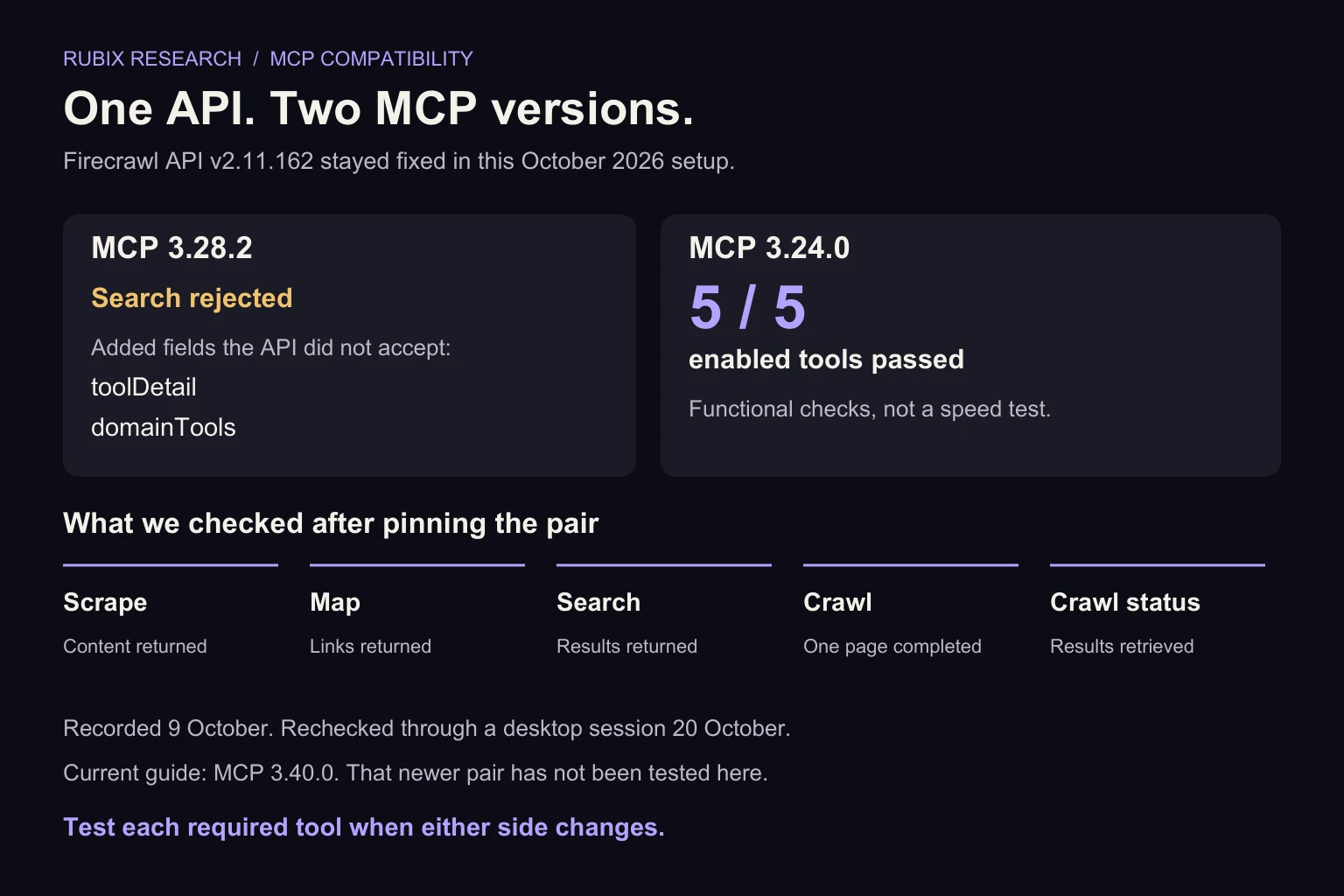
If self-hosted Firecrawl MCP search fails with an invalid request body, check what the MCP package sends to your API before changing the model or its prompt. In a Rubix research experiment, MCP 3.28.2 sent two search fields our Firecrawl v2.11.162 API rejected: toolDetail and domainTools. Pinning MCP 3.24.0 gave us a working pair, with all five enabled tools passing their checks. That was an October 2026 setup; newer releases need their own test.
There are two versions to check
The MCP package is the adapter your assistant calls. The Firecrawl API behind it does the work. Running the adapter on your computer doesn't by itself make the scraping backend local. Firecrawl's current local-MCP documentation uses FIRECRAWL_API_URL to choose a self-hosted API; without that choice, you can still be talking to the cloud.
Our API ran in Docker on Windows, with a Node MCP process connecting to it. Search and scrape have separate request contracts, so getting page content back from scrape leaves the search path untested. You can have a working connection and still send a request the API doesn't understand. That's the gap we'd check before touching the agent's prompt.
What failed in our setup
On October 9, 2026, we tried MCP 3.28.2 against Firecrawl v2.11.162. The API rejected the added toolDetail and domainTools search fields. We pinned MCP 3.24.0, kept the API release fixed and checked the tools again. That compatible package also expected search sources as objects, each with a type, rather than a list of plain strings.
Firecrawl's local-MCP guide uses 3.40.0 in its examples now, checked November 24. We haven't tested that release against this API, so 3.24.0 is our historical working reference, not a default we'd prescribe for a new installation. For an upgrade, we'd take the documented pair and run the checks again. This result doesn't establish a bug in today's release.
| API release | MCP package | Observed result |
|---|---|---|
| v2.11.162 | 3.28.2 | Search fields toolDetail and domainTools rejected |
| v2.11.162 | 3.24.0 | All five enabled tool checks passed |
| Not tested here | 3.40.0 in today's official guide | No compatibility result from Rubix |
What the five passing checks actually covered
The October 9 setup record includes a direct HTTP scrape as well as the MCP checks. On October 20, all five tools also succeeded from an active desktop session. We retrieved the completed crawl directly from the local API too, which confirmed the assistant's tool calls had reached that Docker instance.
Each of the five enabled capabilities completed a functional check. That's what the count means; it isn't a count of requests or benchmark samples. We didn't measure throughput, memory requirements or sustained load, and we didn't separately qualify a page that required browser rendering. There was no model-accuracy measurement.
| Tool | Evidence we kept |
|---|---|
| Scrape | Page content returned through MCP |
| Map | Site links returned |
| Search | Search results returned through the compatible package |
| Crawl | A bounded, one-page crawl completed |
| Check crawl status | The completed job and its results could be retrieved |
How we'd narrow down your error
For your own setup, the first useful note is the API release, the MCP package version and where the requests go. A working health URL only proves that something answered there. Firecrawl's self-hosting guide makes the same distinction and asks you to run a real scrape before calling the deployment usable.
If a direct API request works but the equivalent MCP tool fails, compare the request fields on both paths. Keep credentials and page contents out of any shared diagnostic report. An unknown-field response gives you something specific to investigate: the adapter's payload and the API's accepted schema. Repeating that rejected payload won't make the API accept it.
If both paths fail, the adapter may be innocent. Check the endpoint's response and the relevant service logs before rolling versions back. A connection failure, an authentication refusal and a rejected field need different fixes. For a timeout after starting a job, keep its identity and check its status; our retry-and-recovery article covers why starting the work again can be the wrong move.
We'd keep the pair fixed while testing each tool the workflow needs, with failed results saved beside the passes. The same checks then give you a practical upgrade test when either version changes. Seeing a tool in the assistant's menu tells you it was registered; you still need to see it finish its job.
Decide which tools you actually need
We enabled the five capabilities we'd checked and left cloud-dependent tools out of this local setup. Self-hosting still makes outbound requests to websites, and optional providers can add other data flows. It also leaves you responsible for storage, access controls and upgrades. Our functional checks didn't establish that any of those production responsibilities were finished.
For a workflow that only needs a known page, qualify scrape first. Add search when discovering the URL is part of the job, and crawl when you need a bounded collection of pages. That gives each new capability a concrete acceptance check.
If you're adding web research to an agent, bring Rubix the failing tool call and what the next step needs from it. We can help check the integration before you spend time swapping models. Our AI and agentic systems service covers that work, and the AI agents and automation section on our pricing page gives the starting scopes.