Computer vision
Roboflow Workflows: cost per image and four gotchas we hit
In a research experiment, we put a two-model vision pipeline on Roboflow's serverless Workflows. A detector finds the animal, custom code crops it, a classifier names one of 353 breeds and more custom code shapes the answer. The bill came to about 0.000436 credits per image, and four problems showed up that our local runs never had.
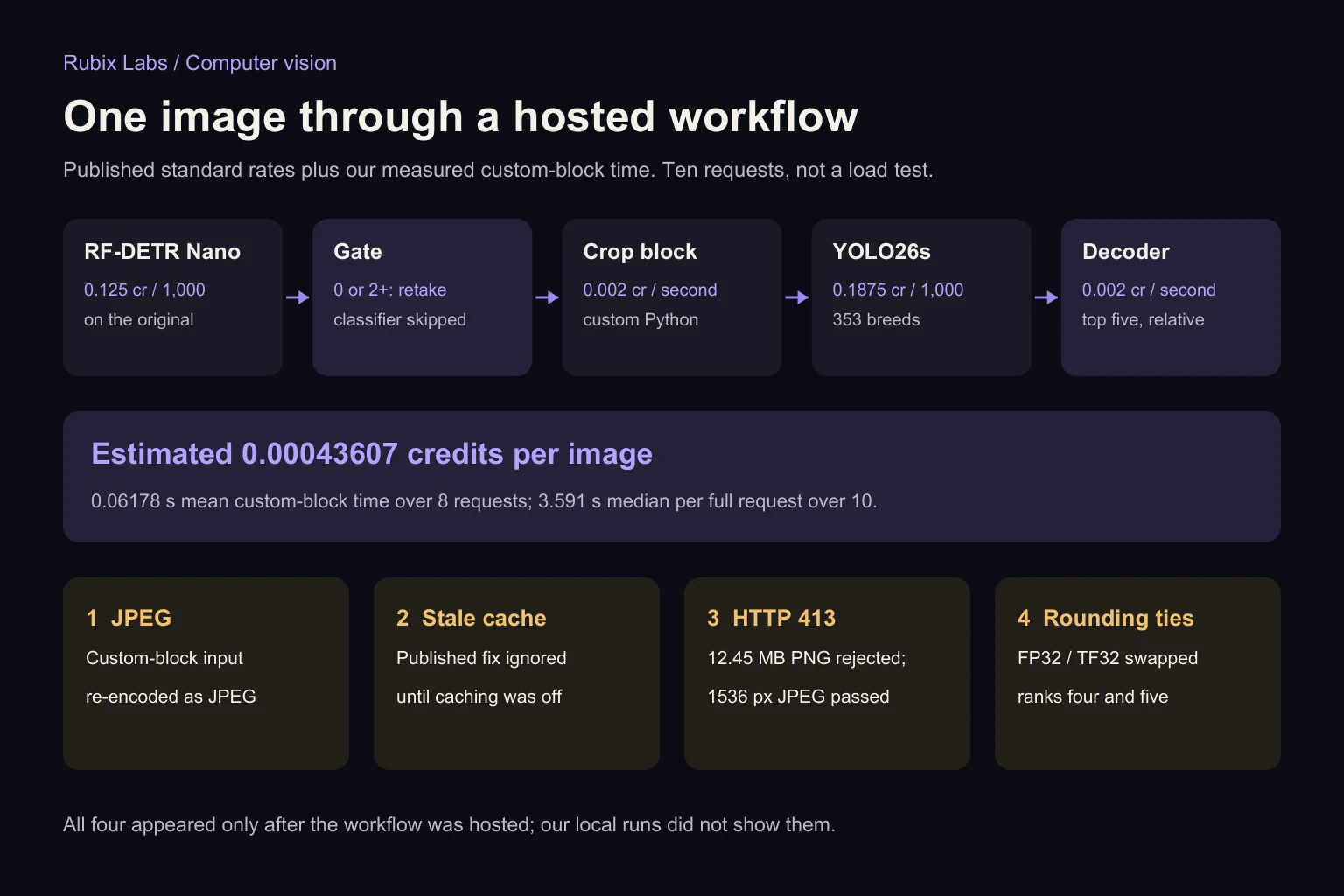
What ran where
RF-DETR Nano looked at the original photo at confidence 0.35 and IoU 0.50. No animal, or more than one, returned a retake and skipped the classifier entirely. With exactly one, a custom Python block cropped the box with a 0.15 margin, letterboxed it onto black at 224 pixels and sent it to our YOLO26 classifier. A second custom block decoded the scores, mapped the 353 labels to stable IDs and returned five suggestions for each species.
Two details in the response catch people out. The classifier returns up to 300 rows, and those are breed alternatives for one crop, not 300 animals. Its probabilities are renormalised over the labels it returned, with the 53 lowest omitted, so they're relative scores rather than calibrated confidence.
What one image cost
Roboflow bills most models per image and custom Python by execution time, and workflow logic itself isn't billed per image. The published standard rates are 0.125 credits per 1,000 images for RF-DETR Nano, 0.1875 for a YOLO26 small detection model, which is how our packaged classifier was hosted, and 500 execution seconds per credit for custom code.
Our eight passing classify requests averaged 0.06178 seconds of custom-block time. With the two model calls, the estimate is 0.00043607 credits per image, or about 4.36 credits for 10,000 images. The account had 10 included monthly credits, which works out to roughly 22,932 images if nothing else used them. We'd plan around 20,000 with headroom and check the usage ledger, which can lag behind the requests.
Retakes cost less because the classifier never runs. Failures aren't all free, though. Roboflow's pricing docs say requests that fail with 401, 403 or 404 still use credits, while 402, 408, 409, 423, 429 and 5xx failures don't. A client that retries blindly after a timeout can pay twice for work that had already finished.
| Item | Published standard rate | Our measurement |
|---|---|---|
| RF-DETR Nano detection | 0.125 credits per 1,000 images | One call per image |
| YOLO26 small model | 0.1875 credits per 1,000 images | Skipped on retakes |
| Custom Python blocks | 500 execution seconds per credit | 0.06178 s mean per image |
| Estimated total | Sum of the three | 0.00043607 credits per image |
Gotcha 1: the custom block got a JPEG
Our first cloud result looked fine and failed an exact comparison: the crop's RGB hash didn't match the one we computed locally. The custom block's image input had been re-encoded as JPEG on the way in, so our crop came from slightly different pixels.
We fixed it by passing the original image bytes as a separate base64 input, cropping from those, and sending the prepared crop on as PNG. After that, all eight classify requests matched the local crops exactly. If your pipeline depends on exact pixels, for hashing, measurement or very small objects, check this before you trust any number.
Gotcha 2: the cache served the old workflow
After we published a corrected workflow, the next request still ran the previous definition, because workflow caching was on. Setting the request flag that turns caching off fixed it. That flag only controls which definition loads; inference still runs every time. We now confirm that the published, saved and local definitions match before counting a test, and we kept both rejected early responses out of the ten passing cases.
Gotcha 3: a 12.45 MB photo got HTTP 413
One test photo was a 12.45 MB PNG from a phone, and the API answered HTTP 413. A copy of the same photo, EXIF-oriented and resized to 1536 pixels as a quality-95 JPEG, passed. We now cap the encoded image at 4 MiB before sending, and the workflow rejects anything over 12 million pixels, so resizing happens on our side before the request goes out.
Gotcha 4: rounding ties swapped two breeds
The first hosted classifier changed the expected order of the fourth and fifth breeds on one frozen test crop. The service reported ONNX FP32, and a local run with TF32 matrix maths reproduced the same ties, which points at arithmetic, though it can't prove what the server does internally. A shared 64-point offset in the scores was magnifying tiny rounding differences until two breeds swapped places.
We didn't retrain. We rescaled the scores through the model's activation stages so the offset disappeared, and the decoder inverts that monotonic transform before ranking. On eight frozen crops every top-1, top-3 and top-5 order then matched, with a maximum probability drift of 0.179426 percentage points against a 0.5-point limit we fixed before sending. Exact equality at our local 1e-4 tolerance still didn't hold, so we treat the hosted model as matching rankings rather than every bit.
Speed, and when we'd use it
Ten authenticated full-pipeline requests took a median of 3.591 seconds, from 1.675 to 4.218. The classifier's reported model compute on eight calls averaged 17.08 ms. We didn't test concurrency or sustained throughput, so those figures say nothing about a busy hour.
For a low-volume pipeline built from two standard models, hosted Workflows were cheap and quick to wire up. Keep the API key on a server: on the free plan we used, the key had access to the whole workspace. Rubix can help run the same parity checks on your pipeline before you rely on its answers.