Document engineering
PDF redaction: check what the black box leaves behind
We put a black rectangle over a fictional account reference in a PDF, saved it and opened it again. The reference looked gone. Two text extractors still returned every character. That's a problem if you're preparing documents for an outside reviewer or an AI tool. At Rubix, we'd check the saved file before sending it to anyone.
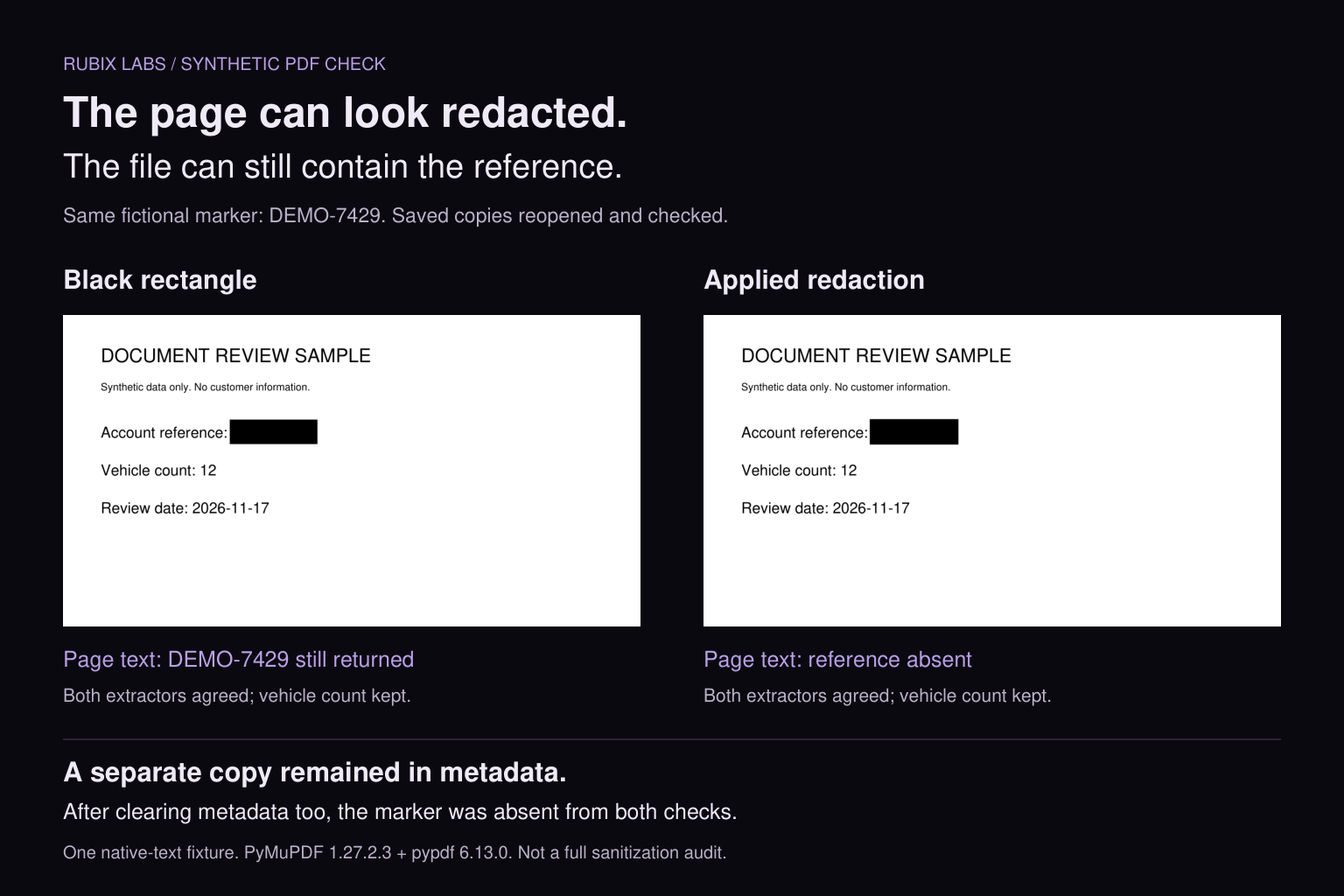
One reference, two places to find it
Our sample is deliberately boring: one native-text page, a fictional account reference of DEMO-7429, a vehicle count of 12 and a review date. We also put DEMO-7429 in the PDF's subject metadata. No customer documents, scans or model calls were involved.
We made three copies. The first got an opaque rectangle drawn over the reference. The second used PyMuPDF's redaction annotation followed by apply_redactions. The third applied the same redaction and cleared the document metadata. Each was saved to a new file with garbage=4 and deflate=True, then closed and reopened. Those settings collect unused objects and compress streams. We weren't testing an incremental save over the original.
For page text, we used PyMuPDF 1.27.2.3 and pypdf 6.13.0 independently. We also inspected the metadata and checked that the vehicle count survived. Deleting the whole page would make the reference disappear, sure, but it would be a pretty useless document review.
| Saved copy | Reference in page text | Reference in metadata |
|---|---|---|
| Original | Present in both extractors | Present |
| Black rectangle | Present in both extractors | Present |
| Redaction applied | Absent in both extractors | Present |
| Redaction + metadata cleared | Absent in both extractors | Absent |
The black rectangle left the text alone
The covered and redacted copies both showed a black block in the right place. Their extracted text was different. In the covered copy, the PDF still contained Account reference: DEMO-7429. In the redacted copy, only the label remained. Both kept Vehicle count: 12.
That distinction matters for document AI. If a pipeline extracts native text from the covered file, the reference can enter its input even though a person looking at the preview can't see it. Our test stops at extraction; we didn't upload these PDFs to a model or measure any provider's behavior.
PyMuPDF documents redaction as a two-step operation: mark the area, then apply it. Its guidance also calls out the save and garbage-collection settings needed to remove the affected text. Drawing a shape doesn't perform that operation. Neither does merely leaving a redaction annotation waiting to be applied.
The page passed. The subject field didn't.
The second copy is the more interesting failure. Searching its extracted page text for DEMO-7429 found nothing. But the PDF subject still said Internal note: DEMO-7429. We'd removed the page occurrence and left another copy in the same file.
Clearing metadata in our third copy removed that occurrence too. This is a result for the fields we created and checked, not a complete PDF sanitizer. Our fixture has no attachments, form fields, comments, scanned images or signatures. A production review has to account for the features present in its actual files.
Adobe treats sanitization as a separate part of its redaction workflow and offers removal of hidden information. A page-text search alone can't tell you what else is packaged inside the document. The subject field in our sample is a fairly blunt demonstration of that.
Check the copy that's actually leaving
Say a team needs a vendor to investigate why its document parser missed a vehicle count. The vendor may only need a fictional reproduction of the bug. If a real document is necessary, the person responsible for disclosure needs to define what can leave and where it can go.
For an approved sharing copy, apply the intended redactions, review hidden information, save it and reopen it. The review needs both the rendered pages and extracted text. Searching for the values meant to be removed catches one kind of failure; checking the useful content you meant to keep catches another. In our example, the vehicle count had to survive.
Scanned pages need their own treatment. The sensitive information may exist in image pixels as well as a searchable OCR layer. This native-text experiment doesn't test either case. Build representative fixtures for those inputs and inspect the resulting images and text. A clean result from the easy file shouldn't stand in for the messy ones.
Finally, verify the attachment or object selected for delivery. The original and the reviewed copy shouldn't be interchangeable in the send step. Record which output was approved, and avoid pasting the removed values into logs or review notes that travel with it. Otherwise the paperwork can put back what the redaction removed.
Where we'd put AI in this workflow
AI could help propose likely names, references or addresses for review. We'd keep that proposal separate from permission to share. A missed field is still a missed field, even if the model sounds confident, and a correctly spotted value can still be removed incorrectly by the PDF step.
Our published Document OCR case describes extraction, structured output and a human review path. This article adds a new synthetic check; it isn't a claim that we delivered this redaction system for that project. For a new build, we'd make the reviewer inspect the saved output and connect approval to that exact file before delivery.
If your team is passing insurance PDFs between staff, vendors and AI services, bring Rubix the sharing workflow and a few fictional examples of what must stay or go. We can help scope the document preparation and review steps around the tools you already use.