Website engineering
Multilingual website SEO: give each language a URL
A Spanish page should survive being copied into a message. Open that link on another device and you should still get Spanish, without hunting for the language button again. That's where we'd start at Rubix: does the URL actually take people to the page they chose? Then we'd check what its metadata says, because the visible translation can look fine while those settings point somewhere else.
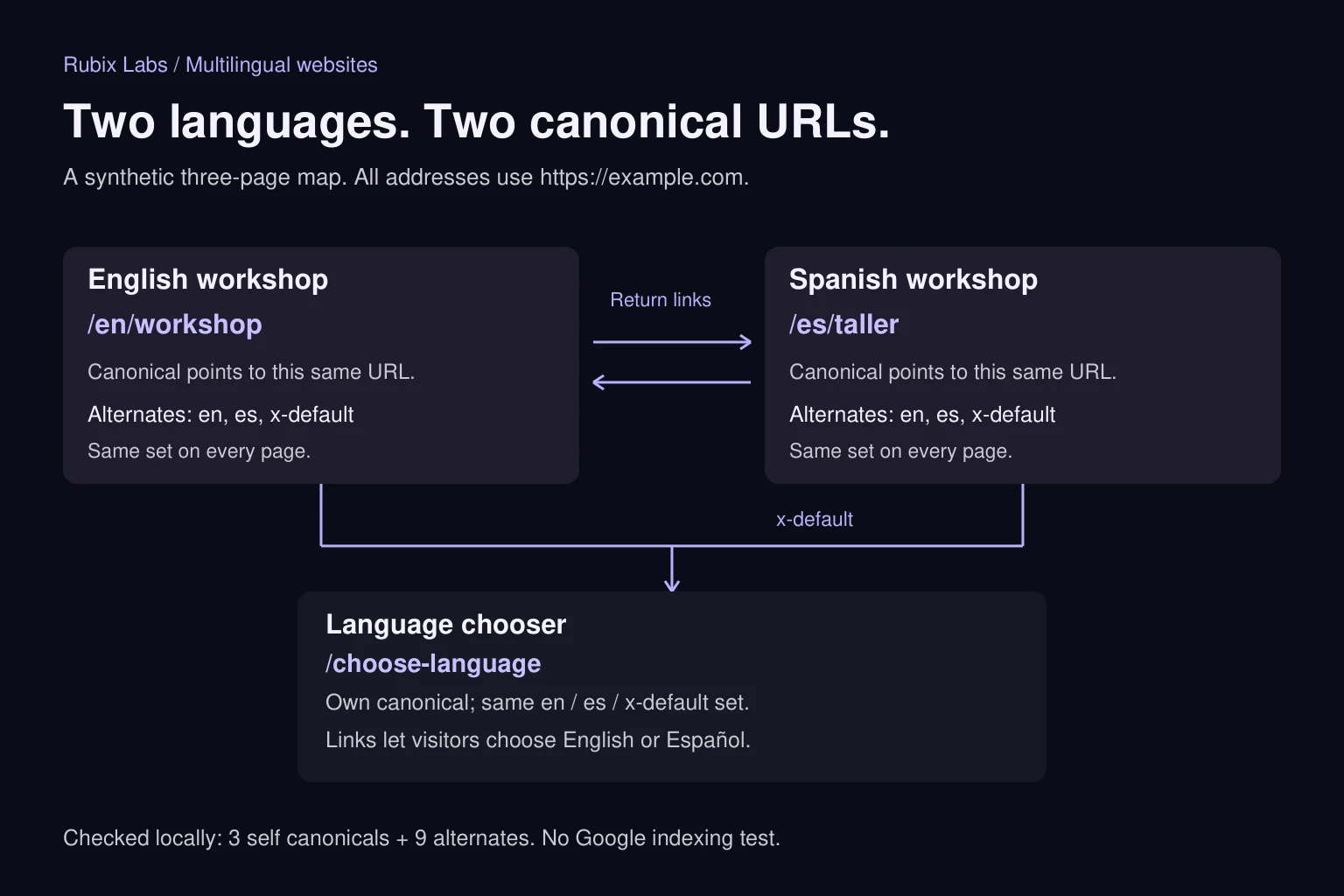
The Spanish page isn't a spare English page
A canonical URL expresses which page you prefer for duplicate or very similar content. Assume our workshop description has been fully translated. The English page gets its own canonical, and so does Spanish. Pointing both at English would work against that plan. Google's canonical guidance calls for a canonical in the same language when using hreflang, where one exists. Even then, the declared canonical is a signal, not an order Google must follow.
Hreflang has a different job: connecting equivalent language or regional versions. Our two workshop pages belong together because they describe the same offering. A Spanish homepage and an English workshop detail page wouldn't be equivalent just because they're on the same website.
We'll use en and es here because this fictional business has one offering in two languages. If it later offers different sessions or terms in different countries, someone needs to decide what those pages should say before a developer adds country labels.
Write down the map before wiring up the CMS
We added a third fixture page, https://example.com/choose-language, as a neutral chooser. Every page in this little group declares the same three alternates: en points to the English workshop, es to the Spanish workshop, and x-default to the chooser. Each page also has its own canonical.
Google's hreflang instructions require fully qualified alternate URLs and return annotations between versions, including each page itself. X-default provides a fallback for languages not covered by the other entries. We chose a selector for that role; a separate selector page isn't mandatory for every website.
We put the alternate annotations in the HTML head for this example. HTTP headers and sitemap annotations are other supported methods. We'd maintain one approach through the site's existing publishing system instead of manually copying the same configuration into three places.
| Page in the fixture | Its canonical | Alternate entries on this page |
|---|---|---|
| English workshop | https://example.com/en/workshop | en: English; es: Spanish; x-default: chooser |
| Spanish workshop | https://example.com/es/taller | en: English; es: Spanish; x-default: chooser |
| Language chooser | https://example.com/choose-language | en: English; es: Spanish; x-default: chooser |
Four mistakes that still leave a readable page
We generated three tiny HTML files with sample headings, language links and the metadata above. A local parser checked them against our agreed map: three self canonicals, nine alternate annotations, no mismatches. Then we changed one thing at a time. The check caught all four altered fixtures below.
This tests generated HTML and link relationships in memory. We didn't request these addresses over HTTP, ask Google to crawl them or test a production localization system. The sample bodies aren't a complete translated website, either. A passing map tells us nothing about whether a customer's Spanish copy makes sense.
| Deliberate change | What the check found |
|---|---|
| Spanish canonical changed to the English URL | Canonical differed from the intended self URL. |
| Spanish page lost its English alternate | The agreed alternate set was incomplete; the return annotation was missing. |
| English page pointed to an absent Spanish address | The alternate differed from the map and had no target in the fixture. |
| Spanish alternate became /es/taller | The URL was relative, differed from the map and did not resolve to a fixture key. |
Follow the visitor past the translated heading
Metadata won't help much if the Spanish enquiry button drops someone into an English-only form. We'd walk the whole journey in the chosen language: the service explanation, form labels, validation errors and confirmation. If support is only available in English, say so before asking the visitor to write a long message in Spanish. That's a business decision the translation tool can't make for you.
Set the HTML lang attribute to match the page, and mark a language switcher's Spanish label appropriately too. That helps assistive technology choose pronunciation. Google determines page language from visible content rather than that attribute, so a correct lang value doesn't replace a real translation.
Later, the English workshop changes from two sessions to three. Who updates Spanish? We'd have the publishing system flag that version for its reviewer. Otherwise, a perfectly translated old sentence could leave the two pages selling different things. The booking details need checking along with the words.
If a translation isn't ready, we'd leave it out of the published alternate set. A button labelled Español should lead to the Spanish version of this page when one exists. Otherwise, explain the missing version instead of quietly sending the visitor to an unrelated homepage.
What we'd check on the live site
The local fixture is a starting point. On a real release, we'd request each published URL without cookies and inspect the response, rendered page and final destination. A preview environment can look perfect while production middleware redirects every Spanish request. We'd also look for accidental noindex directives, crawl blocks and canonicals pointing at a preview domain.
Next we'd follow the language links by keyboard and test the enquiry journey on a narrow screen. Copying a Spanish URL into a fresh browser session should preserve the page choice. The sitemap should list the intended public canonical URLs; translated drafts and retired addresses don't belong in that list.
After launch, Search Console can help inspect what Google has seen. A submitted sitemap or correct tag isn't proof that either page is indexed, and neither promises a ranking. We'd keep the technical checks separate from what searchers actually do with the pages.
Start with one page people actually need
You don't have to translate the whole site in one go. We'd start with a service page that has a clear audience, a matching enquiry path and someone who can review the language. That gives the team a complete small release to maintain before the content count grows.
Rubix builds web products and the workflows behind them. If you're adding another language, bring us a page and tell us who needs to use it. We can work through the URL structure and publishing rules with you, then follow the journey through to the enquiry. That's a more useful starting point than commissioning a hundred translations and figuring out where they belong afterwards.